

Simple Solution To integrate IDM into opera browser. Opera needs to be integrated manually with IDM and this tutorial will show you how to. To integrate IDM into opera browser there are a few manual tweaks you need to make. By default Internet download manager integrates automatically into some major browsers like Chrome and Firefox, Opera on the other hand does not always get automatic integration with IDM.
Note that Opera versions 14 and lower have limited support of IDM and do not work with IDM extension.
Before we begin make sure both Opera and IDM are up to date. Update Opera to the latest version. Update by Opera by going to ‘Opera > Menu > About Opera > Check for Updates’. Update IDM to the latest version by going to “IDM Menu> Help->Check for updates” located at the Top menu items list.
Follow these Simple Steps to integrate IDM (Internet Download Manager) into Opera Browser
Step 1. Enable Advanced Browser Integration In IDM
First Open IDM and Go to “Options->General” IDM dialog box (arrow 1 on the image). Enable “Use advanced browser integration” option (arrow 1 on the image). . Now check that integration into Opera is also enable or ticked (arrow 2 on the image). To enable IDM in Opera Browser tick the “Opera” check box. Click OK to save on the dialogue box to save your settings.

Step 2. Open Opera Browser Extensions Page
This step relates to only for Opera versions 15 and higher.
In this step we will install the IDM extension for Opera Browser Manually. This is similar to installing Browser addons for Chrome or Firefox. First Open the Opera Browser extension page.
Go to Opera > Menu > Extensions > Manage Extensions

This will open the Opera Extensions page, captured below.

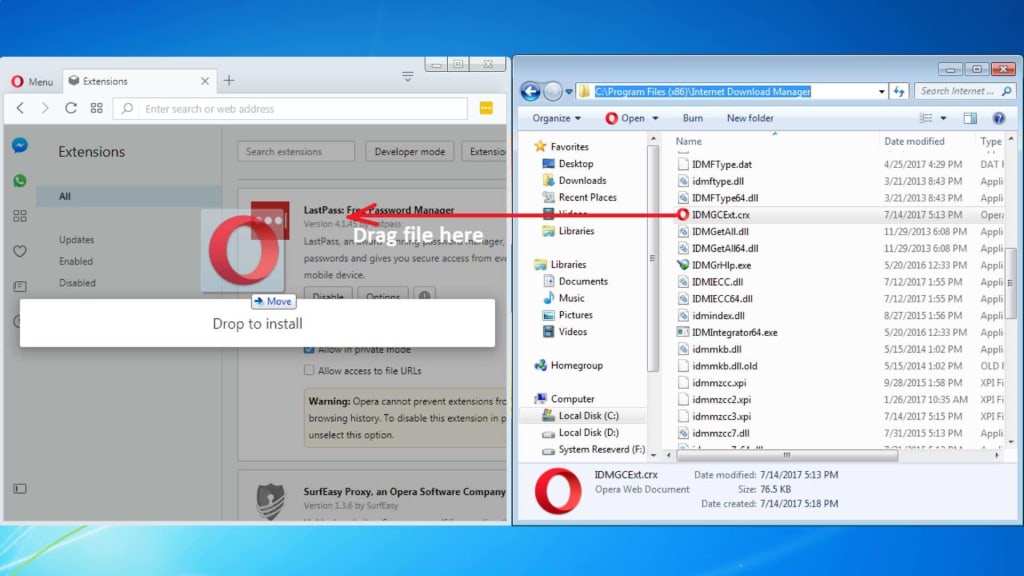
Step 3. Open IDM Installation Folder and find IDMGCExt.crx
Open the IDM installation folder usually located at “C:\Program Files (x86)\Internet Download Manager” by default (With no quotes). In the folder located or search for a file named “IDMGCExt.crx” or “IDMGCExt” (With no quotes). The “IDMGCExt” file is the IDM extension for Opera.

Step 4. Drag and Drop IDMGCExt.crx into Extensions Page
Now simply drag and drop “IDMGCExt.crx” (arrow 4 on the image) file from IDM installation folder into the “Extensions” page opened in your Opera Browser.

Step 5. Accept Install of IDM Integration Module
After the drag and drop a message prompt will pop up asking you to accept installation of the IDM Integration Module. Click on “Install” (arrow 1 on the image) to finish installation of “IDM Integration Module” in Opera Browser.

Step 6. (Optional) Allow IDM in Private Browsing Mode
Final Step is to enable “Allow in private mode” by ticking the checkbox (arrow 2 on the image). Restart the browser and you have successfully integrated IDM into Opera Browser.
Congratulation you have successfully integrated Internet Download Manger (IDM) with Opera Browser!
How easy was that? Feel free to leave Comments Below.
Thank you! I solved the problem with IDM 6.25 and Opera 39
You are welcome Max! Glad it helped you solve your problem with Opera and IDM integration.
great tutorial thanks alot man
You are Welcome Junior Azeh. Enjoy!
thank you! 😀
Thank you so much
thanks
Superb… Solve my problem. Thanks you bro!
wow that was easy
Great, perfect solution… 🙂
Hey man you are awesome, Did you know that?! Thank you
Great, THANKS a LOT!
!!Solved, a Big Thank You to You
Most Rev Sirs, It worked…. It worked !!! Oh! You have made me so much elated with joy now !!! Infinite gratitude…
Rev Sirs, It worked…. it worked… !!! My great trouble solved. Great tutorial. Infinite gratitude.
Thank you so much, it worked
It’s works. Thanks a lot.
Mny Tnx
That’s so helped me.
Really Helpful! Thanks for your efforts to make it easy for opera users to understand the integration with IDM.
Solved, a Big Thank You to Youuuuuuuuuuuuuuuuu
Thanks a lot.
I could be successful and it works.
Thanks!! You’re a lifesaver
thank you for solving my problem
your site is awsome
Solved…………………………………… bundle of thankS bro……………..
Thank you !
Arigato senpaiiii
Thanx a lot,,,,,,
10000 kisss
Great also works on Opera GX browsers 🙂
Thanks dude you’re amazing…………
Thank you a lot,It works
Thank you its working now
Thank you for this.
that worked like a charm
Thank you so much, I installed opera years ago, and suddenly the Update Checker error so I need to reinstall it.
Then I forgot how to install IDM in this browser. lol
Great post! I found the step-by-step instructions really helpful. Integrating IDM into Opera was seamless thanks to your clear guidance. Keep up the great work!
Great post! I appreciate the detailed steps for integrating IDM into the Opera browser. It worked flawlessly for me. Thanks for sharing!
Great post! I’ve been looking for a way to integrate IDM into Opera, and your step-by-step guide made it super easy to follow. The screenshots were really helpful too! Thanks for sharing!
Great post! I found the step-by-step instructions really helpful for integrating IDM into my Opera browser. The screenshots made it easy to follow along. Thanks for sharing!
Great post! I’ve been looking for a way to integrate IDM into Opera, and your detailed steps made it super easy to follow. Thanks for sharing!
This guide was incredibly helpful! I was having trouble integrating IDM into my Opera browser, but following the steps outlined here made the process so much smoother. Thanks for sharing such clear instructions!
Great post! I’ve been looking for a clear guide on integrating IDM with Opera, and this really helps. The step-by-step instructions are easy to follow. Thanks for sharing!
Great guide! I found the step-by-step instructions really helpful for integrating IDM into the Opera browser. The download link for the extension worked flawlessly. Thank you for sharing!
Great tutorial! I’ve been looking for an easy way to integrate IDM with my Opera browser, and this guide was super helpful. Thanks for breaking it down step by step!
Great guide! I found the step-by-step instructions on integrating IDM into the Opera browser to be really helpful. The tips on troubleshooting were particularly useful. Thanks for sharing!
Great post! I found the step-by-step instructions very helpful for integrating IDM into Opera. The screenshots were a nice touch too. Thanks for sharing this guide!